


STREAM24 SHARE · FREE FOR MAC
Skip the upload.
Send files straight to another Mac or iPhone on your network — full speed, no cloud stop along the way. Free for every Stream24 user, on every plan.
Free · macOS 14 or later
Version 1.0.0 · build 3 · 4.7 MB · macOS 14 or later · Apple silicon and Intel
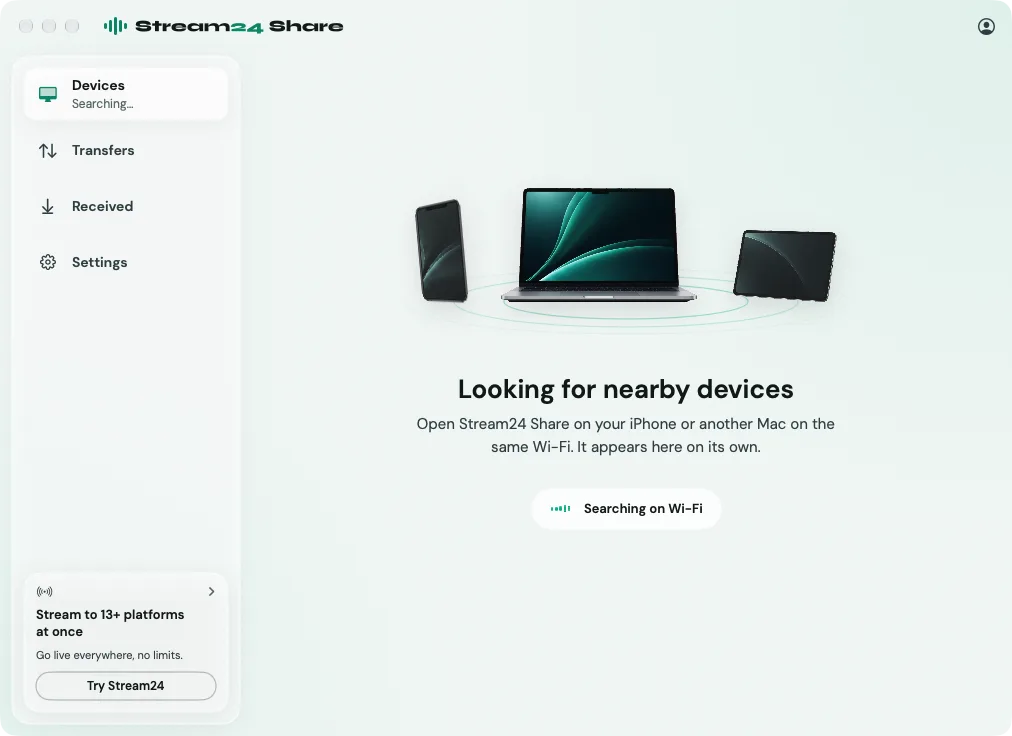

A direct line to the other device.
Open Share on both devices and they find each other in seconds. Pick the files, send, done — there’s no inbox to check and no link to share.
Files move device to device over the network you’re already on. They never pass through a server, so there’s nothing to upload and nothing to wait on.
Works with Photos and Videos from iPhone today. Files app support is next.
-
01
Full Wi-Fi speed, not upload speed
-
02
Free for every Stream24 user, on every plan
-
03
Your files stay on your network, never Stream24’s servers


How it works
Three taps, not a wait.
01
Open Share
Drag it to Applications, then launch it and sign in with your Stream24 account.
02
Find the other device
It shows up the moment it’s running Share too.
03
Send
Pick the files and go. They land in Downloads instantly.
Designed for Mac
Small app. Nothing in the way.
Share is a 4.7 MB disk image. It opens on a nearby-devices view, takes a drop anywhere on the window, and keeps Transfers and Received one click away.
Once you are signed in it works without internet. The transfer itself only needs the network the two devices already share.
- Mac
- Apple silicon and Intel
- macOS
- 14 or later
- Install
- 4.7 MB disk image
- Account
- Any Stream24 plan, Free included
Updates
Share checks for updates quietly, about once an hour. When one’s ready, it opens the disk image for you — drag the new copy to Applications. A transfer already underway finishes first. You can also choose Stream24 Share → Check for Updates.
FAQ
Questions about Stream24 Share
What it does, what it costs, what it needs.
Nothing. Share is free on every Stream24 plan, Free included. It signs in with the Stream24 account you already use for Studio, OmniDownload and the web app.
No. Files move straight from one device to the other over the network you are both on, encrypted. They are never uploaded to Stream24 and there is no link to expire.
From a Mac, any file or folder — drop it on the window or pick it. From an iPhone, photos and videos from Photos; the Files app comes next. On a Mac, what you receive goes to Downloads.
Yes. Both devices run Share on the same network, and each appears on the other as soon as it is open. There is no pairing code to type.
Share checks about once an hour and opens the new disk image when one is ready — drag the new copy to Applications. It does not replace itself, and it waits for a transfer to finish. Stream24 Share → Check for Updates does it on demand.
Not yet. This release is for Mac, macOS 14 or later, on Apple silicon and Intel. Share for iPhone is being prepared for the App Store.
Send it across the room.
Download Stream24 Share for Mac and move files at the speed of your own network.
Free on every Stream24 plan. macOS 14 or later.
Stream24 Share